I would like to share news from BBC Technology:
US frees unused airwaves for 'super wi-fi' technology
The US broadcasting regulator has announced it will make unused television airwaves available for new "super wi-fi" technology.
In a statement, the Federal Communications Commission described the spectrum between television channels as "prime real estate" for mobile devices.
It hopes the move will turn swathes of the country into giant wi-fi hot spots.
Officials also said it would encourage innovation and job growth and make the US more competitive globally.
"It will enhance our economy and strengthen our global competitiveness, lead to billions of dollars in private investment and to valuable new products and services - some we can imagine, and many we can't," Federal Communications Commission (FCC) Chairman Julius Genachowski said in a statement after the commission's unanimous vote.
'Smart city' applications
The FCC said the move marked the first time in more than two decades a large band of spectrum had been opened. The airwaves became vacant last year when the US moved to an all-digital television broadcast system.
Technology firms are eager to begin using the airwaves, in part because signals in that spectrum can travel several miles, penetrate walls and allow large transfers of data.
The move came after several successful pilot programmes across the US, Mr Genachowski said.
Wilmington, in the state of North Carolina, for example, has experimented with "smart city" applications to manage traffic and water quality.
Some broadcasters fear the move will interfere with their operations, including wireless microphones used to report news.
Read more: http://www.bbc.co.uk/news/world-us-canada-11402284

Khmer fonts and Technology
Monday, September 27, 2010

Wednesday, September 22, 2010
Google Font API
Google announced their new Font API on May 19, 2010. Now Khmer Unicode font is avaible in Google Font API directory already: http://code.google.com/webfonts?subset=khmer
Friday, August 20, 2010
Chrome OS
wikipedia.org: Google Chrome OS is an upcoming Linux-based, open source operating system designed by Google to work exclusively with web applications. Announced on July 7, 2009, Chrome OS is set to have a publicly available stable release during the second half of 2010.
Chrome OS will not be available as a download to run and install. Instead, the operating system will only ship on specific hardware from Google's manufacturing partners. The user interface takes a minimalist approach, resembling that of the Chrome web browser. Because the only application on the device will be a browser incorporating a media player, Google Chrome OS is aimed at users who spend most of their time on the Internet.
Chrome OS 0.6.427 is available! Now with support for native Windows applications!
Download Live CD here: http://getchrome.eu/download.php
Chrome OS will not be available as a download to run and install. Instead, the operating system will only ship on specific hardware from Google's manufacturing partners. The user interface takes a minimalist approach, resembling that of the Chrome web browser. Because the only application on the device will be a browser incorporating a media player, Google Chrome OS is aimed at users who spend most of their time on the Internet.
Chrome OS 0.6.427 is available! Now with support for native Windows applications!
Download Live CD here: http://getchrome.eu/download.php
Wednesday, July 21, 2010
Android 'GingerBread' in the last quarter of 2010

We are waiting to see this version support complex script or not.
Source: http://www.techtree.com/India/News/Android_GingerBread_Edition_Details_Revealed/551-112113-580.html
Sunday, April 11, 2010
uspce.dll was shipped with Windows Mobile 6.5.3 already
I got answer from Microsoft: "Uniscribe support is available beginning with the COM3 version of Windows Mobile 6.5 (or Windows Mobile 6.5.3).
The UI should include our new “bubble” controls in the softkey area if it’s COM3."
The UI should include our new “bubble” controls in the softkey area if it’s COM3."

Monday, March 8, 2010
Tuesday, March 2, 2010
Add registry for Uniscribe on Windows Moblie 6.5
Go to HKEY_LOCAL_MACHINE\SYSTEM\GDI
Click Edit , New key
replace New Key #1 by Uniscribe
From HKEY_LOCAL_MACHINE\SYSTEM\GDI\Uniscribe
Click Edit, New DWORD Value
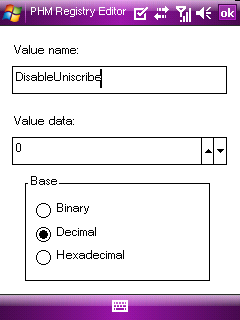
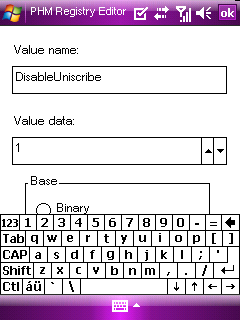
add value name and value data.
Value name: DisableUniscribe
Value data: 1
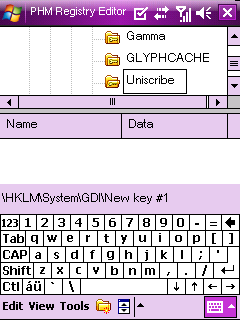
When put value data: 1, Uniscribe is disabled, and it is enabled when replace to 0. For Windows Mobile 6.1 and 6.5, I recommend to put Uniscribe value data 1, then go to address bar of internet explorer to type Khmer unicode website, example: www.rfa.org/khmer, then add to Favorites... for next time, we don't need to type domain name again, just click on Favorites to access Khmer website.
Then turn Uniscribe value date to 0, and restart for reading webiste.
uspce.dll for complex script rendering is not compatible with Windows Mobile 6.1 and 6.5 yet, so when we put Uniscribe value date: 0, Khmer script rendering is good, but we can't see letter on address bar. So we need to turn off Uniscribe when we need to type new website address.
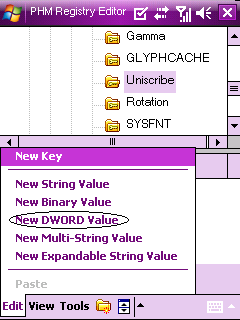
Click Edit , New key
replace New Key #1 by Uniscribe
From HKEY_LOCAL_MACHINE\SYSTEM\GDI\Uniscribe
Click Edit, New DWORD Value
add value name and value data.
Value name: DisableUniscribe
Value data: 1

When put value data: 1, Uniscribe is disabled, and it is enabled when replace to 0. For Windows Mobile 6.1 and 6.5, I recommend to put Uniscribe value data 1, then go to address bar of internet explorer to type Khmer unicode website, example: www.rfa.org/khmer, then add to Favorites... for next time, we don't need to type domain name again, just click on Favorites to access Khmer website.
Then turn Uniscribe value date to 0, and restart for reading webiste.
uspce.dll for complex script rendering is not compatible with Windows Mobile 6.1 and 6.5 yet, so when we put Uniscribe value date: 0, Khmer script rendering is good, but we can't see letter on address bar. So we need to turn off Uniscribe when we need to type new website address.


Subscribe to:
Posts (Atom)